
Skyward® SIS Data Exchange
Eliminate double data entry and effortlessly sync course requests, teacher section assignments, and final master schedules between Skyward® and USA Scheduler.
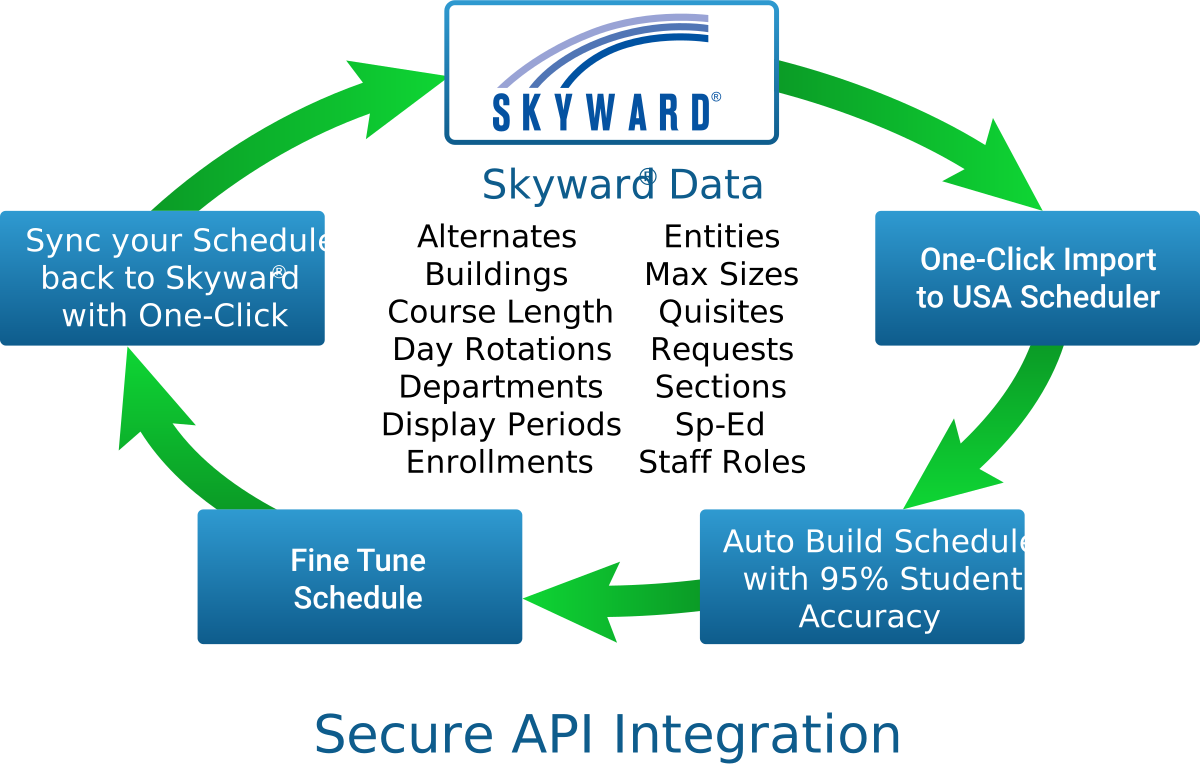
One-Click Secure Integration Skyward® SIS
USA Scheduler offers exclusive one-click import and write back functionality for Skyward® Qmlativ users. This can save hundreds of hours of manual data entry while you maintain Skyward® as your secure data backbone.
1. Import your data files directly from Skyward®. The engine will build then return yourmaster class schedule with 95%+ accuracy.

2. Make any adjustments to your schedule with our easy to use drag and drop interface. Quickly resolve conflicts using our exclusive “Perfect Placement” conflict resolution engine.
3. Write your completed schedule back to Skyward® with one click and you’re done.

Designed to Maximize Skyward® Scheduling Efficiency
Many school districts running Skyward® find that building complex high school master schedules manually requires weeks of repetitive tweaking. USA Scheduler interfaces directly with your Skyward® system, importing all student course requests and running millions of section placement algorithms to resolve singletons, labs, and room capacity constraints.
Direct Skyward® Request Import
Export student request files directly from Skyward® SMS or Qmlativ and import into USA Scheduler with 1-click schema matching.
Automated Schedule Conflict Engine
Our build engine analyzes your Skyward® course catalog, teacher certifications, and room allocations, eliminating schedule conflicts automatically.
Seamless Schedule Export Back to Skyward®
Once finalized, export complete section builds and student period assignments back into Skyward® without manually entering a single section number.
Skyward® Compatibility
SMS 2.0 & Qmlativ Certified
- Supports Skyward® SMS 2.0 & Qmlativ Platforms
- Preserves Skyward® Course Codes & Section IDs
- Automated Validation Checks Before Export
- Full Support for High School & Middle School Schedules
Ready to Save Your District Time & Money?
Get an optimized schedule with 95%+ accuracy on your first build with USA Scheduler.